


In the previous article, I struggled through getting GitHub Copilot (at the time based on GPT 4o) to generate a small Swift/SwiftUI/AVFoundation application. The app was about 400 lines long but Copilot struggled to handle more than a hundred lines or so at a time. Essentially every line in the app required manual rewriting.
Twelve months later, I wanted to check back in to see if it is finally possible to have fun, vibe coding as Andrej Karpathy coined it, in Swift? More specifically, can I, as an experienced Swift programmer, feel like an LLM is not just helping but doing most of the work in a trivial (under 500 line) app?
Or does LLM output continue to make a mess and leave me feeling like I need to throw everything out and rewrite myself?
In the last 12 months
Did I use LLMs after my last article?
Last year, I wrote about GPT 4o via GitHub Copilot in Visual Studio Code. Outside the article, I had also tested Claude Sonnet 3.5 in Cursor.
To be blunt: after testing them out, I have not used LLMs for programming for the rest of the year. Attempting to use an LLM in that way was simply too frustrating. I don’t enjoy cleaning up flawed approaches and changing every single line. I do regularly ask ChatGPT how to use specific APIs, but I’m really just using it as a better documentation search or asking for sample code that is missing from Apple’s documentation. I’m not directly using any of the code ChatGPT writes in any of my apps.
Update: Two weeks after writing this article, my team at work changed our approach and now we’re involving LLMs different aspects of our workflow and using them for about half our programming tasks. Oh well, some comments age like milk.
In the meantime, I have watched plenty of presentations about letting Claude Code, and other tools, completely build an “app” but the successful presentations have usually focussed on JavaScript web apps or Python wrappers around small command-line tools. The two times this year that I’ve watched developers try the same with Swift apps has been a somewhat random affair – sometimes reaching a conclusion and sometimes getting stuck on non-working solutions and excuses claiming it does sometimes work if left to run for another 20 minutes.
Versions go up
This time around, I want to test a little more broadly. Looking at the biggest three non-local (frontier) coding models, they are now:
- GPT 5.2 (up from 4.0)
- Gemini 3 (up from 1.5)
- Claude 4.5 (up from 3.5)
A number of local (edge) LLMs have also released this year offering supposed coding capabilities in less than 16GB RAM (so you can still have Xcode open on a 32GB system), including:
- Qwen3-Coder-30B
- GPT-OSS-20B
- I also briefly tested: DeepSeek-R2-Lite, Devstral Small 2, Nemotron 3 Nano
I’m going to throw a Swift coding challenge at the free chat versions of all these – plus the same GPT 4o model as last year – and see where things stand. Feel free to claim that paid versions or agentic models would be better but that’s not what I’m testing.
I wish Apple’s Swift Assist was one of the models on this list but that didn’t happen. Performance was rumored to be poor but it would have been interesting to see if Apple could keep a model trained on up-to-date Swift. Most LLMs are trained on data that is 2+ years old and their Swift style often feels older still. In writing this article, I encountered LLMs adding
#availabilitychecks for iOS 13, zero knowledge of async/await, no use of iOS/macOS features from the last 3 years and no idea what Swift 6 is.
Attempting to prompt the entire app
Last time, I used pretty simple prompts and incrementally built the app piece by piece. It was frustrating and worked poorly. I’m just here for the vibes and gibes so I’m not going as slow this time.
This time, let’s go with a significant prompt since I’m looking purely for models that can one-shot the whole thing:
Create a macOS app written in Swift, using SwiftUI and AVFoundation, that synthesizes rain sounds.
The audio engine should manage a number of raindrops. The raindrops should be created with some minor randomization of timing but the average rate should be controllable using a slider in the user-interface so that average rates between 20 per minute and 4000 per minute are possible.
Each raindrop should be synthesised using AVAudioSourceNode and the generation should involve a separate “impact” sound, followed by a small delay, followed by an exponentially decaying “bubble” oscillation. The user interface should include sliders to adjust the impact amplitude, the delay duration, the bubble amplitude, the bubble frequency and the bubble decay rate. As with the timing, each of these parameters should have minor randomisation so the drops do not all sound mechanically identical. As the sliders are adjusted, a SwiftUI Chart should show a sample waveform for the raindrop based on the current settings.
To fill out the overall “rain” soundscape, the audio engine should also implement pink, brown and white noise generators whose amplitude can also be controlled via sliders in the user interface.
That’s pretty close to a description of the entire app from the previous article.
I’m returning to this app because I like the mix of overall technologies involved. There’s some basic SwiftUI, some really annoying to configure AVAudioEngine stuff, some Float/Double conversions which are always tricky for LLMs primarily trained on less-type-safe languages. Finally, there’s a need to coordinate concepts from audio rendering through to onscreen display with Swift Charts.
There’s nothing in this prompt that would require Model abstraction, persistence, state restoration or networking – but in a vibe-coded app, maybe that’s for the best.
I’m going to be generous to all the models and allow 15 minutes cleanup after generation, to see if I can get failing efforts running. Yeah, I know in advance that there’ll be issues. I’ll give a score out of ten, mostly by deducting points based on how many compile and runtime issues the code has and whether there are any missing features.
Let’s see how it goes.
Clarification: I didn’t make it clear in the original text of this article but I will not be prompting inside an agent for these tasks. This is an effort to see the raw one-shot ability of different models so this will be conducted in single API calls.I am looking for the raw strength of the models for Swift programming, NOT the capability of an agent to complete the task even when the model is clumsy and mistake-prone. Obviously, in an agentic harness with tool calling and more, these models are capable of much more.
GPT 4o
Since this prompt is a different approach than last year, I wanted to starting by running the prompt against the same model I tried last year
And the result is terrible.
Xcode is showing 21 errors over the 383 lines and 5 files generated (AudioEngine, ContentView, NoiseGenerator, Raindrop and WaveformChartView).
A new default Xcode setting for Mac app projects (SWIFT_UPCOMING_FEATURE_MEMBER_IMPORT_VISIBILITY=YES) now makes it mandatory to
import Combinebefore you can useObservableObject. Since this is a new change and all the solutions generated make use ofObservableObject, this means that most models (all except one) had a compilation error on this point. It feels like it might be a Swift/Xcode/AppKit issue but even if it’s not, LLMs are slow to pick up on changes like this.
I can easily fix simple errors like unhandled conversion issues (Int32 to Int).
The bigger problems start with the noise generator which contains duplicated properties for each of white, brown and pink shoved into a single type for no reason. You still need to create 3 instance for each type of noise so having all the properties in one is just wasted effort. But there’s no way to instantiate each type of noise because the type property is missing (even though the AudioEngine tries to call NoiseGenerator(type:) – that function that doesn’t exist). It’s a complete mess.
The WaveformChartView was constructed with 5 parameters (impactAmplitude, delayDuration, bubbleAmplitude, bubbleFrequency and bubbleDecayRate), none of which exist (the actual WaveformChartView is expecting an array of raw samples).
Additionally, the scheduleRaindrops, renderAudio functions were just a placeholder comment (you know, the critical functions of the app) and the case .pink and case .brown branches of the createNoiseBuffer function were also empty comments. As was the onAppear function in the ContentView which read simply “Initialize audio engine and start generating sounds”.
I’m way past my 15 minutes cleanup time just trying to analyze the mess that’s been made.
Score: 2/10
There’s some scaffolding there and maybe you could use it as a starting point. Maybe. But it’s missing most of the functionality and there could be hours of cleanup, further work or prompting to get it working and honestly, I might prefer to start over. It’s possibly worse than last year.
GPT 5.2
GPT generates a quick hierarchical overview which I like.
RainApp
 ├─ ContentView (SwiftUI UI + Charts)
 ├─ RainParameters (ObservableObject)
 ├─ RainAudioEngine
 │   ├─ AVAudioEngine
 │   ├─ AVAudioSourceNode (rain drops)
 │   ├─ AVAudioSourceNode (noise)
 │   └─ RaindropScheduler
 └─ DSP
     ├─ RaindropVoice
     ├─ NoiseGenerators
But despite this hierarchy, it generated all 295 lines in a single file. Thanks.
The code did not compile as-is. There’s some kind of confusion between UnsafeMutableAudioBufferListPointer.Element (which doesn’t have a floatChannelData property) and AVAudioPCMBuffer (which does):
for buffer in abl {
    let ptr = buffer.floatChannelData![0]
    ptr[frame] = Float(sample)
}
So I ended up replacing this with the following code (I’m sure there’s a smarter way to do this):
for buffer in abl {
    buffer.mData?.bindMemory(to: Float.self, capacity: Int(frameCount))[frame] = Float(sample)
}
With that change (and an import Combine) everything else seemed to work.

Raindrop Synthesizer from GPT 5.2
Score: 7/10 Contained a nuisance of a compile bug. The UI’s missing most labels and it’s updating the chart on every frame, making things super sluggish. But if you get past all that, I guess it works.
Gemini 3
Gemini isn’t very chatty. After seeming to complain that “this is a sophisticated request”, it tersely spat out 227 lines over 3 files (RainEngine, ContentView and RaindropSynthesizerApp).
The code did not compile as-is. Obviously it’ll need the standard import Combine line but the following line used for the pink noise generator isn’t valid Swift:
private var b0, b1, b2, b3, b4, b5, b6: Float = 0.0
This corrects with a single multi-selection code edit and the result is:
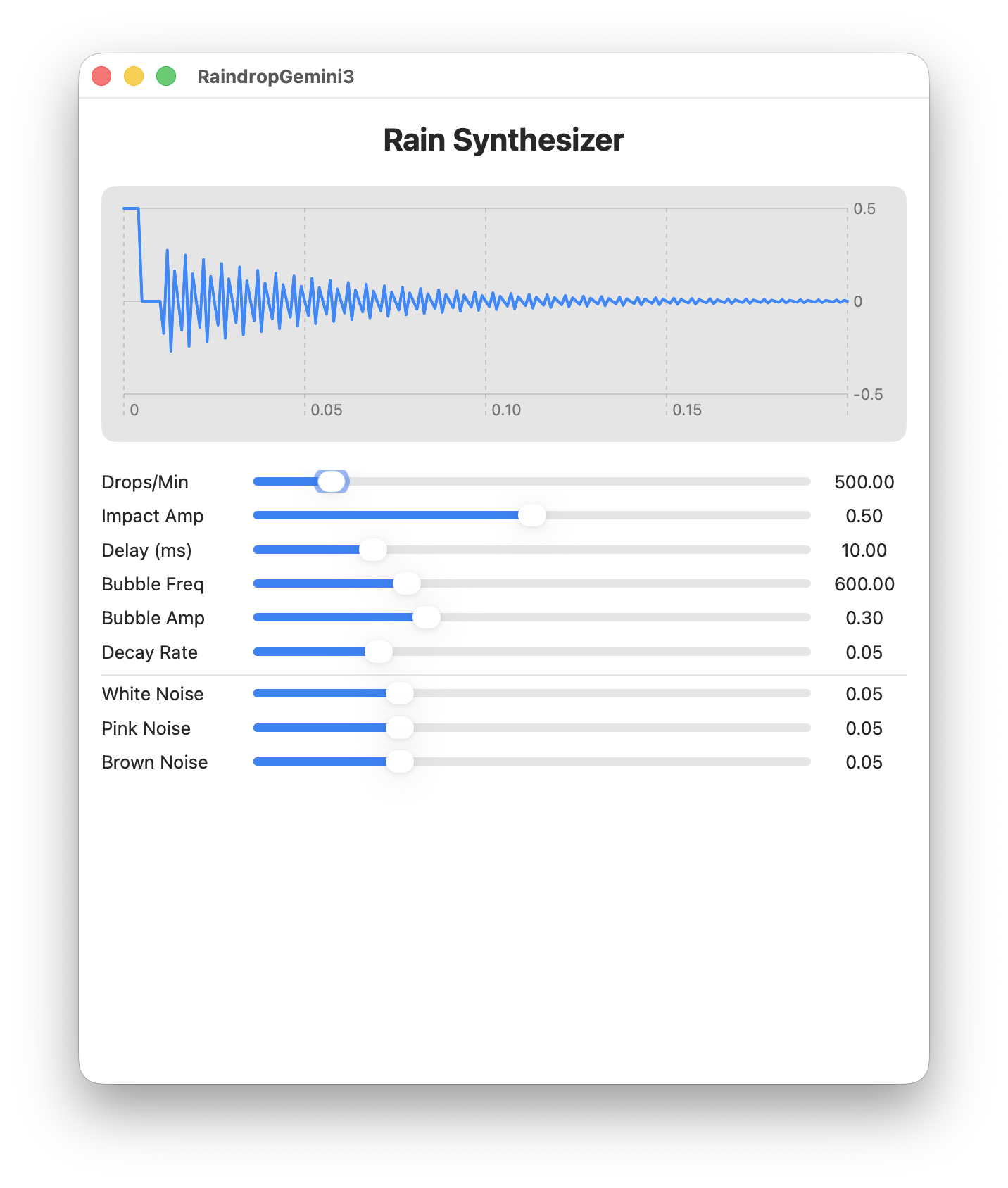
Raindrop Synthesizer from Gemini 3
This was by far the shortest solution to the prompt and it’s one of the best. Compared to GPT-5.2, its coding bug was more straightforward, it has labelled everything and runs fast. I don’t think it needed a min-height of 700 but otherwise, this is pretty good.
Score: 8/10 Made one trivial coding error but it’s otherwise well laid out and works well.
Claude Sonnet 4.5
Claude’s web UI puts summary information in the left column while it generates the code in the right. That means you can read the summary while the code is generated. A nice affordance – although the summary information is useless.
The generated code is a little more verbose than the other implementations (445 lines in a single file). But it has a SwiftUI Preview and all the UI is commented and neatly divided into sections.
The only compilation issue was the failure to import Combine.
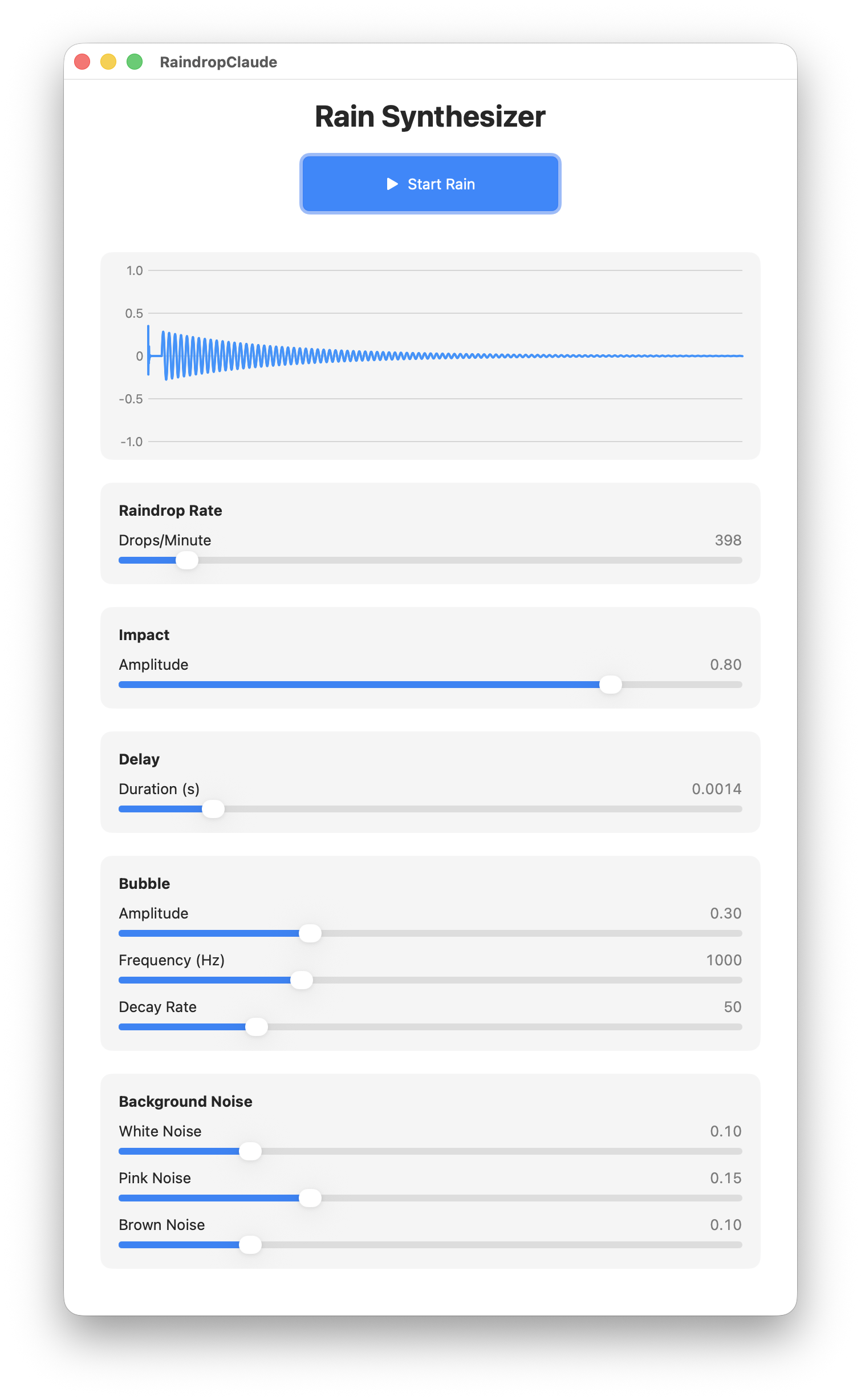
Raindrop Synthesizer from Claude Sonnet 4.5
This is the first implementation to offer a “Start/Stop” button. Technically, I didn’t request a start/stop button but it’s a nice affordance (and managing audio cancellation is one of the trickier task).
But the button affects only the drops, not the noise generators, so you still can’t turn the app “off” without quitting. The only other negative comment I have is that the UI is gigantic (it didn’t fit on my 4k monitor’s default 1920x1080x2 resolution).
The code contained abstracted elements (each of those sections and sliders involved reusable functions). Overall, a fairly tidy implementation, if a little verbose compared to the Gemini result.
Score: 9/10 Has its quirks but this is easily the best implementation.
Local LLMs
DeepSeek-R2-Lite, Devstral Small 2, Nemotron 3 Nano
I’ve lumped these all into one category. The reality is that most local LLMs tend to be so bad at Swift coding that I wonder if the model is having technical issues. Nemotron 3 would apparently omit tokens (e.g. writing did instead of didSet and omitting some : characters) so it’s entirely possible there was something wrong in the execution.
Regardless, none of these models produced anything close to a working program. None of them correctly understood what was meant by Swift Charts or correctly used AVAudioSourceNode for live audio rendering (attempting instead to pre-generate buffers). They would call audio rendering functions that don’t exist and try to construct audio node types that don’t exist. DeepSeek even tried to usleep during its audio render function to “delay” the audio – which indicates that it’s really not understanding what’s going on.
Score: 1/10 Unfortunately, many local LLMs tend to fail more than succeed. Not even usable as a starting point.
Qwen3-Coder 30B 4bit
This generated 535 lines in a single file but there were 50 errors immediately in Xcode.
Most of the issues were Float to Double conversion issues but there were also UI issues (too many steps in a slider causes macOS to lock up), audio issues (no mixer resulted in channel mismatch errors thrown when trying to use the audio engine) and ultimately no audio was produced. This implementation also didn’t seem to understand what a SwiftUI Chart is and never hooked up the noise generators (even though it implemented them). The code also tried to use iOS AVAudioSession in a macOS app.
However, after cleaning up the worst of the issues, at least it produced a usable UI.
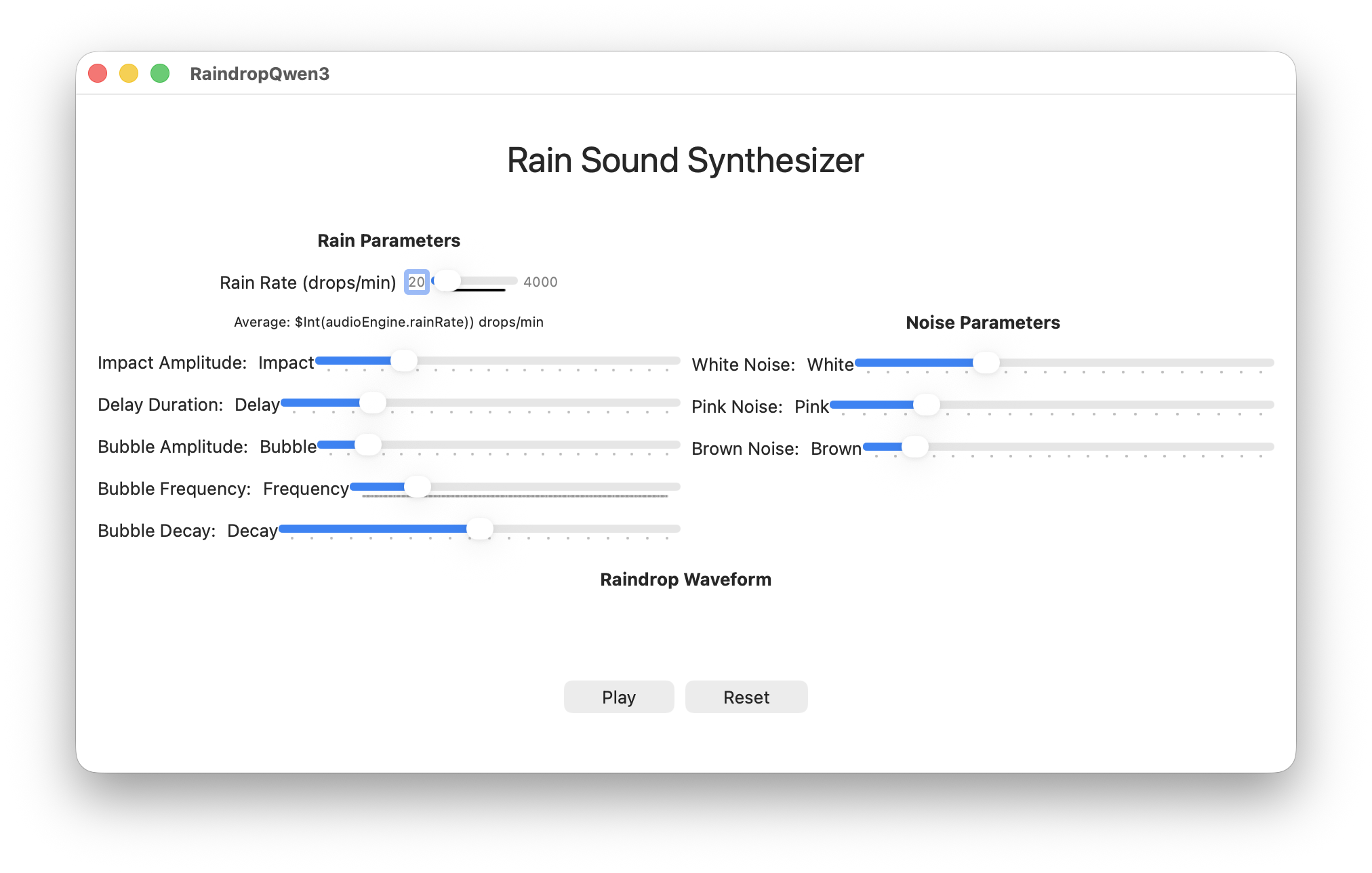
Raindrop Synthesizer from Qwen 3 Coder
Score: 4/10 It didn’t leave any blanks like GPT-4o but there’s still a lot of cleanup needed before this would work.
GPT-OSS-20B mxfp4
This generated 348 lines in a single file. There were lots of Float/Double conversion issues but other than that, this compiled.
This was the only output that included
import Combine. Yes, it had plenty of other compile issues but that does make it better than the full version of GPT on this one point.
After addressing the compiler issues, the code corrupted the stack and crashed on launch. Not great.
After some puzzled staring at the uncorrupted portions of the stack, I realized that this code:
// 2. Add raindrop samples if any are scheduled for this block
let now = CACurrentMediaTime()
while let drop = self.scheduler.nextDrop(before: now + Double(frameCount) / 44100.0) {
    self.apply(drop: drop, to: samples, atSampleIndex: Int((drop.time - now) * 44100.0))
}
Was generating negative sample indexes because the start of the nextDrop is always before now. Rather than fix the drop time logic (or remove the needless use of CACurrentMediaTime) I just guarded against negative indices (so the first few samples from a drop will always be lost) and re-ran.
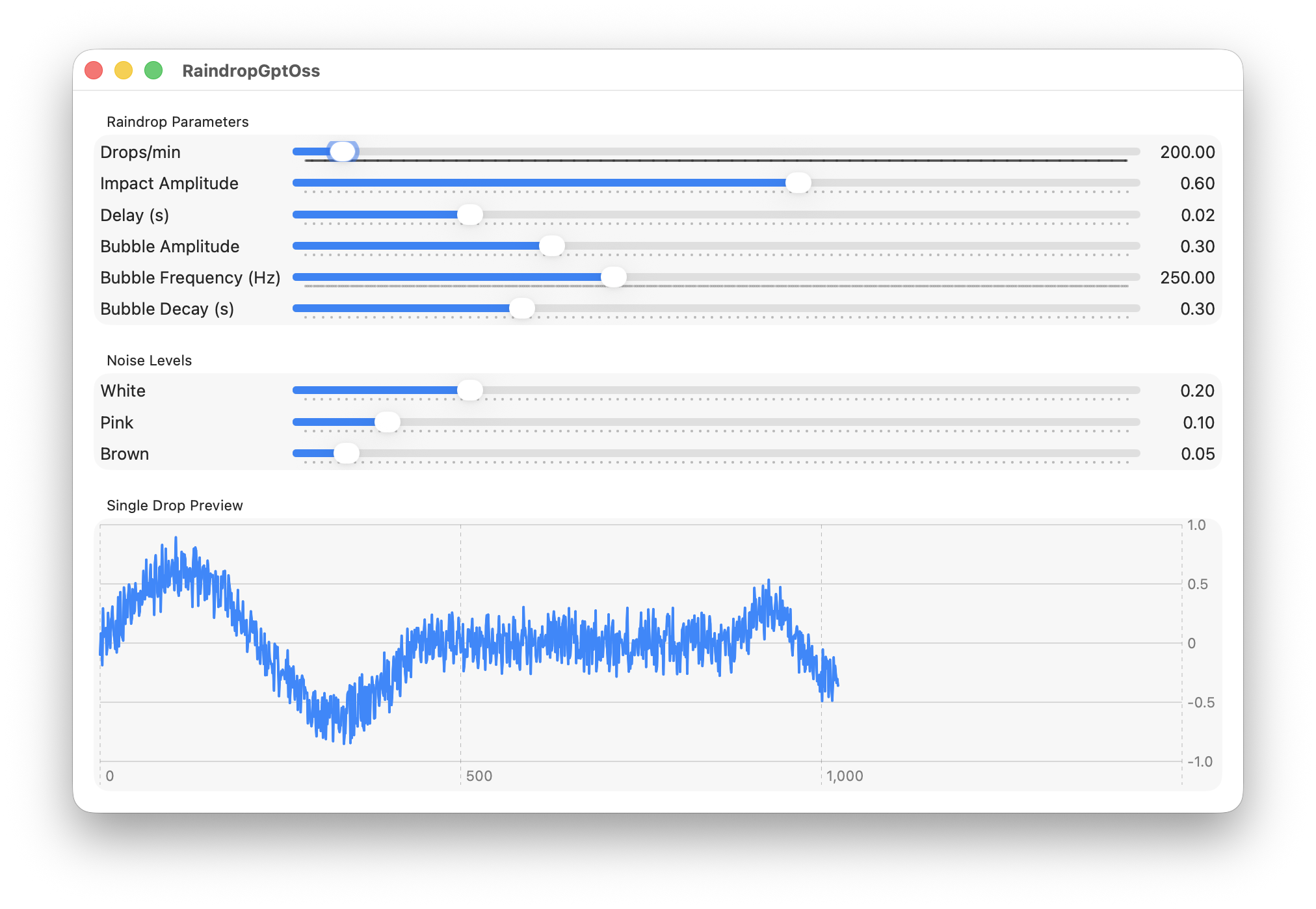
Raindrop Synthesizer from GPT OSS 20B
The noise is being applied to the raindrop waveform in the chart and the scale doesn’t show the entire waveform. Also, there audio is coming only from the left speaker.
But I’m going to give that a passing grade. That’s a working solution after fixing a few type conversion issues and adding one guard.
Score: 6/10 Not bad for a local LLM.
Discussion
I’ve been pretty generous here with the LLMs – allowing 15 minutes to clean up the non-working result that each produced. If a human coder created a PR on one of my repos, submitting one of the best solutions from this lot, I’d still hit them with a pretty long list of cleanup requests.
Even Claude, which I’ve named the winner, produced code that used:
ObservableObject(would be better replaced byObservable)Timer.scheduledTimerandDispatchQueue.main.asyncAfter(would be better replaced byTaskcontaining aTask.sleep)RainAudioEnginerequiresMainActorisolation (audio code should be nonisolated)
Not to mention the oversized UI and the start/stop button that doesn’t stop the noise generators.
Also omitted is that all these LLMs feel completely random. Change a couple words and they’ll give completely different results – often going from working to not-working and back again.
If you don’t like unpredictability, it’s still not a comfortable approach to programming.
Conclusion
Last year, in response to the question “Was Copilot worth it”, my answer was: “Sometimes, yes. But not always”. As I mentioned, I ended up not using LLMs to write code for the rest of the year, so my final subjective feeling was that they really weren’t worth the effort.
This year the answer is more positive for LLMs – at least for the best frontier models. You can now code a 500 line app with one prompt and as little as 1 or 2 line fix-ups, making things not feel like an unending struggle. So that’s progress. They’re still making mistakes, emitting outdated code and running into issues caused by changed defaults in Xcode, so it’s far from a flawless experience. Obviously, when you’re in an agentic harness like Claude Code, Open AI Codex or OpenCode, the agentic can usually perform these touchups, often making LLM assisted programming in Swift effortless.
Local LLMs are much worse. Most are completely useless and even the good ones are barely above the “debatably good enough” position that GPT 4o was in last year. I only have 48GB RAM on this machine, so maybe there are better performing local LLMs beyond what I can run.
Did I have fun vibe coding? Sometimes. Honestly, it’s still been a little exhausting trying out options to find things that work.
I haven’t included the code generated. It’d be interesting to see if others can repeat the same prompt with the same models. My own experience is that you can get quite different results – especially if you change a word or two. It’s all a little non-deterministic. Across all types of LLM, predictability and reliability is not there. For any prompt, you’re rolling dice to see if you get a good job that might help you move forward or a complete mess that would take longer to fix than to scrap and start over.
Will I actually end up using LLMs to write anything beyond sample-code this year? Still unclear.
Update: Yeah, okay, in retrospect I was far too pessimistic and I’m now using these tools most days. Sometimes you don’t see things until you dive in.