


In this article, I’m going to look at some of the frameworks that are built into macOS for numerical algorithms. Fitting with the theme of this series, I’ll mostly be looking at frameworks that can also train an ML model. But there’s a lot of different approaches – Accelerate (BLAS), BNNS, CoreML, MPSGraph – and the real challenge is knowing which one to use – if they are even usable for training.
What on earth is “fchGelu”?
As with last time, I’ll be talking about code in examples but I won’t really be explaining the mechanics of LLMs or the terminology. I’m really here to talk about the macOS frameworks, not the models. I know, it’s pretty cryptic but this isn’t a beginner’s course. If you want to learn more about the terminology, try watching Andrej Karpathy’s Let’s reproduce GPT-2 (124M) where he goes through everything.
Accelerate (BLAS)
The first macOS library for machine learning that I want to talk about is the Accelerate framework. Accelerate is really an umbrella framework for a handful of smaller libraries. Accelerate is a critical library in macOS but one that you can spend a whole career without directly using. It’s been around since Mac OS X 10.2 Jaguar as separate vecLib, BLAS and LAPACK libraries and then in Mac OS X 10.3 Panther was unified into Accelerate. Remember the big cat names? Fun times.
In a general sense, Accelerate contains reusable algorithms optimized for SIMD vector instructions. In Swift, we don’t strictly need the Accelerate framework for SIMD vectorization (in the previous article, I used Relaxed.multiplyAdd and Swift’s autovectorization to get excellent SIMD vectorization) but it’s still really helpful to use Accelerate when you don’t want to stare at your own assembly.
As an example, I recently added rendering to a simple PDF parser library and used the following code based on Accelerate’s vImage to apply an image mask:
if let matte {
    guard var matteBuffer = try? vImage_Buffer(width: width, height: height, bitsPerPixel: 8) else { return nil }
    defer { matteBuffer.free() }
    vImageBufferFill_ARGB8888(&matteBuffer, [1, matte.r, matte.g, matte.b], vImage_Flags(kvImageNoFlags))
    vImageAlphaBlend_ARGB8888(&baseBuffer, &matteBuffer, &baseBuffer, vImage_Flags(kvImageNoFlags))
}
which ended up being about 5 times faster than the raw pixel iteration that I was using before (and about 20 times faster in Debug builds).
You might think you could do this by drawing into a CGContext, and you’d be correct but guess what that uses internally? Same functions. All I’m doing here is cutting out the middleman and giving myself a little more direct control.
Getting back to the matrix multiplication topic from the previous article, Accelerate offers us its BLAS sgemm implementation. BLAS stands for “Basic Linear Algebra Subprograms” and sgemm stands for “Single precision GEneral Matrix Multiplication”. Having someone else optimize matrix multiplication is good but Accelerate BLAS offers another key advantage: it lets us access the Apple Silicon AMX unit without the ugly hacks that I needed in the previous article.
To see how it works, let’s consider the basic (naïve) matrix multiplication kernel in Swift from last time:
static func matmul_forward(out: inout [Float], inp: [Float], weight: [Float], bias: [Float]?, B: Int, T: Int, C: Int, OC: Int) {
    for b in 0..<B {
        for t in 0..<T {
            let bt = b * T + t
            for o in 0..<OC {
                var val = bias?[o] ?? 0
                for i in 0..<C {
                    val += inp[bt * C + i] * weight[o * C + i]
                }
                out[bt * OC + o] = val
            }
        }
    }
}
Doing the same thing with BLAS looks like this:
static func matmul_forward(out: inout [Float], inp: [Float], weight: [Float], bias: [Float]?, B: Int, T: Int, C: Int, OC: Int) {
    cblas_sgemm(CblasColMajor, CblasTrans, CblasNoTrans, Int32(OC), Int32(B * T), Int32(C), 1, weight, Int32(C), inp, Int32(C), 0, &out, Int32(OC))

    guard var bias else { return }

    out.withUnsafeMutableBufferPointer { outBuffer in
        guard let outBase = outBuffer.baseAddress else { return }
        for bt in 0..<(B * T) {
            cblas_saxpy(Int32(OC), 1, &bias, 1, outBase.advanced(by: bt * OC), 1)
        }
    }
}
The matmul_forward function is almost exactly the same as a typical sgemm function, just fused with an additional bias step.
Ignoring all the other optimizations we needed in the previous article, just using cblas_sgemm in the 9 places in the “Basic Swift” implementation where it applies, gives us:
| Model | Tokens/s | Training iterations/s |
|---|---|---|
| Basic Swift | 0.054 | 0.014 |
| AMX | 5.884 | 1.678 |
| Accelerate BLAS | 8.086 | 2.015 |
This one change (in 9 places) made the “Basic Swift” implementation 144 times faster. It’s even 1.2 times faster than my hacky attempt to use the AMX unit directly. The Accelerate BLAS implementation is really impressive. And it’s not just raw speed. Here’s a graph of the CPU usage running:
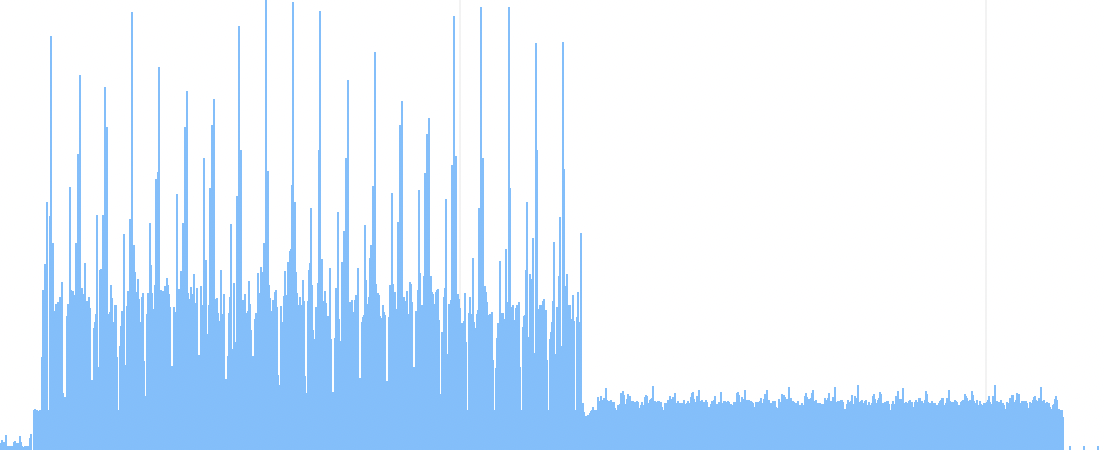
Instruments CPU usage graph for AMX (left half) and BLAS (right half) models
The Accelerate framework manages matrix multiplication that is both fast and very low CPU usage. The only thing that beats it is my “Tiled Metal” implementation running on the GPU.
| Model | Tokens/s | Training iterations/s |
|---|---|---|
| Accelerate BLAS | 8.086 | 2.015 |
| Tiled Metal | 15.049 | 3.371 |
That’s not really surprising. The GPU is practically made for high-performance matrix math and I’m running on an M3 Max which has quite a lot of GPU cores.
You’d have to be crazy to think the CPU would beat that GPU score.
Accelerate (BNNS)
Let’s get a little crazy.
Remember when I said that BLAS stands for “Basic Linear Algebra Subprograms”? Based on the same 1970s naming scheme, Accelerate also offers BNNS or “Basic Neural Network Subprograms”. Catchy. I’m going to pronounce it in my head as “buns”.
BNNS has had a few iterations. There are:
- the “Classic BNNS API” which includes
BNNSNDArrayDescriptorstuff (deprecated) - the
BNNS.namespace (maybe the semi-Classic API because it’s also deprecated) - the ML Compute framework which was based on at least one of the older BNNS APIs (and guess what: deprecated)
BNNSGraph← this is the good one and includesBNNSTensor,BNNSGraph.Builder,BNNSGraph.Builder.TensorandBNNSGraph.Context
Fair warning: searching the documentation for BNNS is a mess. Xcode’s documentation has many flaws and trying to find the non-deprecated BNNS APIs runs into a few of them.
All of the neural network implementations I’ve shown so far have been imperative. This means that they’ve been made of a set of operations that are (ignoring minor changes made by the compiler) executed from start to finish, without possibility of reinterpretation (since the computer doesn’t know where it’s going until the end).
BNNSGraph is, as the name implies, a “graph” API (a kind of declarative dataflow API). This means that you declare the entire journey and the API builds a set of instructions, but the API is allowed to make all kinds of optimizations by tracing backwards from the destination to see what is required.
The general pattern for using BNNSGraph is to load your Swift Array<Float> data into BNNSGraph.Builder.Tensor<Float> values, interpret those values as different shapes, apply different mathematical functions, and then declare some values as the output to ultimately be written into different Array<Float> values at the end.
It’s really not very different from what we’ve been doing up to this point but it replaces for loops with reshape (to change how subsequent functions stride through the values) and with some slightly bigger functions than the simple *, + and exp (or even cblas_sgemm) that we’ve relied upon to this point.
For example, here’s an implementation of matmul_forward in BNNSGraph:
static func matmul_forward(inp: Tensor, weight: Tensor, bias: Tensor, B: Int, T: Int, C: Int, OC: Int) -> Tensor {
    inp.reshape(to: [B * T, C])
        .linear(weight: weight, bias: bias)
        .reshape(to: [B, T, OC])
}
In this case linear is essentially a multiplication by a transposed matrix (same as cblas_sgemm(CblasColMajor, CblasTrans, CblasNoTrans) from the BLAS example was for our row-major matrix) but in this case, it also includes a bias parameter to include what was a messy post-step in our BLAS implementation.
But what I want to draw attention to in this case are the reshape calls on either side. The important point to note is that in a graph API like this, a reshape or a gather or some other traversal operator doesn’t necessarily get translated to a function. Operations like reshape tell subsequent operations that they might need to iterate in a particular order but otherwise, they don’t necessarily do any work. Furthermore, if the full output of this function isn’t needed (maybe it’s causally masked or otherwise removed from the output) then even linear might not do everything it would do in an imperative implementation.
This is where a declarative API can optimize: it can roll operations together, skip unnecessary work, and can work out the best order to traverse memory (so there’s much less of the tiling and threading that filled the end of the previous article).
Another point to notice is that we have a function named linear for performing the application of weights with a bias. That’s a pretty neural-network-specific task. While BNNSGraph could be used for other numerical processing, it’s very clearly catering to a neural network audience.
Here’s our attention_forward block in BNNSGraph:
static func attention_forward(inp: Tensor, mask: Tensor, validAttention: BoolTensor, B: Int, T: Int, C: Int, NH: Int, HS: Int, scale: Float) -> AttentionForwardResult {
    let q = inp[0..<B, 0..<T, 0..<1, 0..<NH, 0..<HS].squeeze(axis: 2).transpose(axes: [0, 2, 1, 3])
    let k = inp[0..<B, 0..<T, 1..<2, 0..<NH, 0..<HS].squeeze(axis: 2).transpose(axes: [0, 2, 3, 1])
    let v = inp[0..<B, 0..<T, 2..<3, 0..<NH, 0..<HS].squeeze(axis: 2).transpose(axes: [0, 2, 1, 3])
    let preatt = q.matmul(other: k) * scale
    let savedPreatt = validAttention.select(preatt, 0 as Float)
    let att = (preatt + mask).softmax(axis: 3)
    let out = att.matmul(other: v)
        .transpose(axes: [0, 2, 1, 3])
        .reshape(to: [B * T, C])
    return AttentionForwardResult(out: out, preatt: savedPreatt, att: att)
}
I’m not even going to copy-paste the previous implementations of attention_forward that I’ve been using: they’re around 70 lines long. The ability to issue squeeze, matmul, select and softmax as single commands is a huge simplicity gain.
And the performance is something I never expected to see from the CPU:
| Model | Tokens/s | Training iterations/s |
|---|---|---|
| Tiled Metal | 15.049 | 3.371 |
| Accelerate BNNS | 53.696 | 3.997 |
That’s the CPU (including AMX) outperforming a high-end GPU (admittedly the GPU algorithm was only coarsely tuned). And yes, it is just the CPU. If you run the engines in Instruments’ CoreML profiling tool, you can observe CPU, GPU and ANE usage and confirm that this engine is training 20% faster than a GPU algorithm on the CPU alone and 3 times faster for inference.
However, there are some downsides to BNNSGraph on the specific topic of training LLMs.
- it’s really not intended for training
- It’s not really intended for LLMs
Addressing the second point, first: squeeze, matmul, select and softmax are nice but LLM-targeted frameworks would have scaledDotProductAttention (dramatically simplifying our attention_forward function) so it still feels like we’re building fundamental blocks from primitives.
Addressing the first point, I’d like to highlight the fact that usually for a graph like this, you’d expect the only outputs to be the logits (the predictions for output tokens). However, in this case, I’ve had to output a lot more: I’ve had to output every single projection from every layer.
Half the file is taken up by a sea of these outputs appended to the graph:
outputs.append(ln1.out)
outputs.append(ln1.mean)
outputs.append(ln1.rstd)
outputs.append(qkv.reshape(to: [batchSize, sequenceLength, 3 * C]))
outputs.append(attention.out.reshape(to: [batchSize, sequenceLength, C]))
outputs.append(attention.preatt)
outputs.append(attention.att)
outputs.append(attproj)
outputs.append(residual2)
outputs.append(ln2.out)
outputs.append(ln2.mean)
outputs.append(ln2.rstd)
outputs.append(fch)
outputs.append(fchGelu)
outputs.append(fcproj)
outputs.append(residual)
And this repeats for every layer.
Why so many outputs? Because on each training iteration, I need to build the backward pass using all these outputs as inputs, so I can update the weights to progress the training. There’s not really an optimized way to update weights. All the engines I’ve shown so far have needed to hold onto projection values for later updates so needing to do this might not seem strange. But this is a graph API and graph APIs can do better.
MPSGraph
Let’s jump to MPSGraph. “MPS” stands for “Metal Performance Shaders” so it won’t be a surprise to hear that it’s going to run in Metal on the GPU.
In general, there’s a lot in common between MPSGraph and BNNSGraph: same tensors, same reshaping, and most of the same gather and softMax functions.
Compared to the Metal implementation I presented in the previous article – which used my own handwritten (but ultimately, only lightly tuned) matrix multiplication kernels – this API is heavily tuned for Metal performance (oh, hey, they put it in the name). And furthermore, it’s a graph API so it has scope for optimizing operations based on dependencies throughout the graph.
The end result is the fastest API built into macOS:
| Model | Tokens/s | Training iterations/s |
|---|---|---|
| Accelerate BNNS | 53.696 | 3.997 |
| MPSGraph | 159.706 | 13.357 |
That’s 3.3 times faster training than the already quite fast BNNSGraph. You can see why this is the library that PyTorch uses on macOS.
But speed is not the only reason to choose MPSGraph for training. Look through the code and you’ll see that this is the first implementation where there are no functions for the backward pass. While there’s a certain symmetry between the forward and backward pass, the backward pass is usually much harder to write but here it is in MPSGraph:
let gradTensors = graph.gradients(of: meanLoss, with: variablesMomentumsVelocities.map(\.variable), name: nil)
That one line computes the entire backward pass. This feature (auto-differentiation) is probably the key feature that defines frameworks that specialize in training since it cuts the difficulty of writing code by 50%-70%. The code knows (from the shape of the graph) how to generate the backward pass.
Okay, those were the good points. Unfortunately, there are quite a few negatives here, too.
First (on the topic of backward passes): MPSGraph contains a handful of functions that we can’t use because they fail, at runtime, to generate gradients. In particular, the scaledDotProductAttention – which would considerably simplify our attention_forward function – seems to break the gradients (although the error it gives is at an unrelated point in the graph). Was I holding it wrong? I don’t know. It’s pretty hard to tell, when the error MPSGraphAutomaticDifferentiation.mm, line 53: error 'Couldn't get gradient Tensor for tensor of op : wpe' doesn’t even refer to a line in my code.
I also encountered issues with the somewhat innocuous-looking variable function giving error: failed to legalize operation 'mpsx.var_handle' (whatever that means).
These are just 2 examples of problems that I wasn’t able to resolve but there were dozens and dozens of issues that came up while I was writing this code where some incomprehensible error message would be raised and I’d have to try replacing lines of code at random until the problem went away. In short, my experience with MPSGraph was filled with a litany of inexplicable and incomprehensible error messages. I nearly gave up on this implementation a few times – honestly it was just infuriating.
And then there’s the ergonomic issues. For a comparison, let’s look at BNNSGraph, a sane, Swift-feeling library:
static func encoder_forward(inp: BNNSGraph.Builder.Tensor<Int32>, wte: Tensor, wpe: Tensor, positionIndices: BNNSGraph.Builder.Tensor<Int32>) -> Tensor {
    let tokenEmbedding = wte.gather(indices: inp, axis: 0, batchDimensionCount: 0)
    let positionEmbedding = wpe.gather(indices: positionIndices, axis: 0, batchDimensionCount: 0)
    return tokenEmbedding + positionEmbedding
}
Fairly tidy, not too complicated. Here’s the same code in MPSGraph:
static func encoder_forward(graph: MPSGraph, inp: MPSGraphTensor, wte: MPSGraphTensor, wpe: MPSGraphTensor, B: Int, T: Int, C: Int) -> MPSGraphTensor {
    let indices = graph.cast(inp, to: .int32, name: "inputIndices")
    let tokenEmbedding = graph.gather(withUpdatesTensor: wte, indicesTensor: indices, axis: 0, batchDimensions: 0, name: "tokenEmbedding")
    let wpeSlice = graph.sliceTensor(wpe, dimension: 0, start: 0, length: T, name: "wpeSlice")
    let btcZeros = graph.constant(0, shape: [B, T, C] as [NSNumber], dataType: .float32)
    let positionEmbedding = graph.addition(graph.reshape(wpeSlice, shape: [1, T, C] as [NSNumber], name: "expandedWpe"), btcZeros, name: "positionEmbedding")
    return graph.addition(tokenEmbedding, positionEmbedding, name: "encoder_forward")
}
Filled with [NSNumber], unneeded prepositions like withUpdatesTensor, needlessly type-safe (a graph API should be able to pick the appropriate types automatically) and filled with the most cumbersome constants like graph.constant(0, shape: [B, T, C] as [NSNumber], dataType: .float32) where BNNSGraph uses simply 0.
MPSGraph is one of the most frustrating APIs I’ve ever used on macOS, seemingly pulling together the worst of Objective-C aesthetics, the incomprehensibility of C++ template errors and adventure game moon logic for constants and casting. Sorry to be so harsh on MPSGraph – getting API aesthetics and ergonomics right is hard – but yeah, I didn’t have fun writing this one.
Oh, and there’s something that the training and inference numbers don’t show:
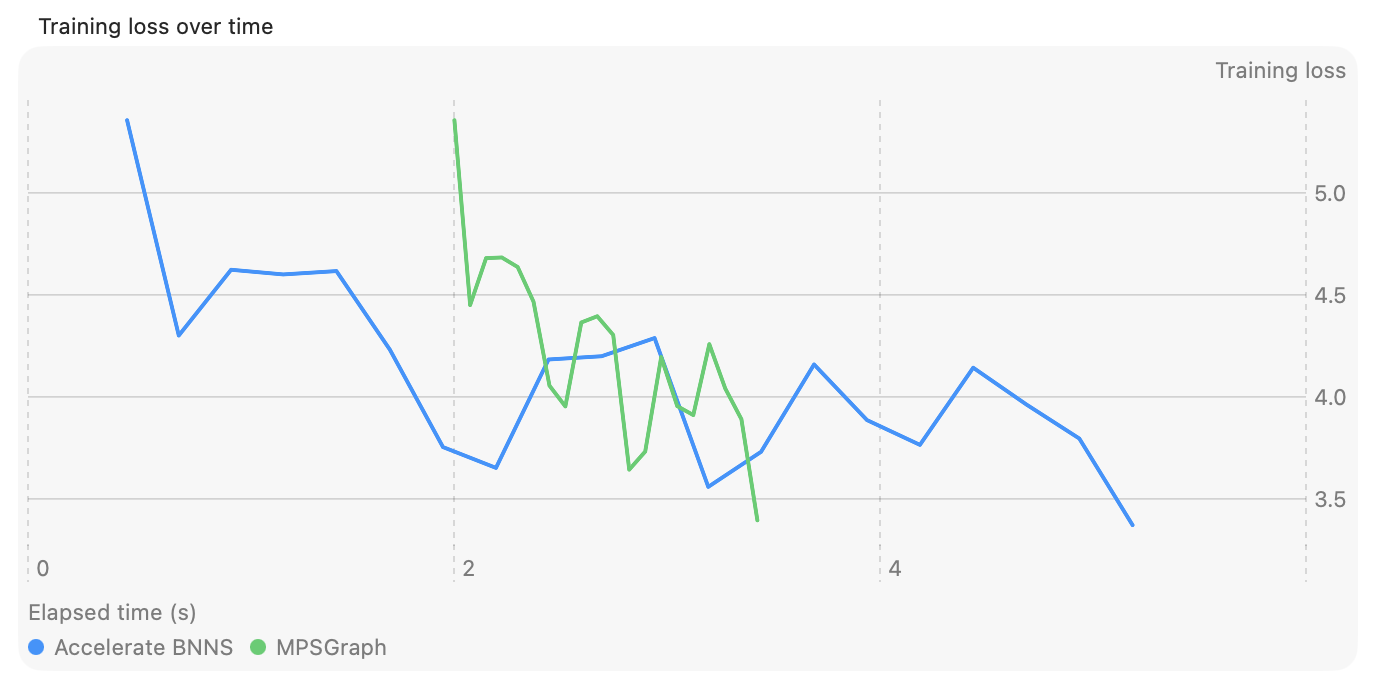
Loss over time for MPSGraph and BNNSGraph
Yes, MPSGraph is fast once it gets going. But this graph shows a 2-second delay before it’s able to emit a single token. Two seconds is a long time to wait. Meanwhile, BNNSGraph has already performed its first 7 iterations.
Oh, and take a close look at the loss curve on MPSGraph: it’s noticeably different at the 4th and 10th iterations (it’s like the first and second humps are convex instead of concave). Of all the libraries I used, MPSGraph is the only one that seems to either be using slightly different implementations of adamW or failing to preserve the same accuracy. I never really got to the bottom of this but it’s another one of those points that makes me question what’s going on with MPSGraph.
Plenty of negatives to consider for MPSGraph but you can’t deny this: it has the fastest matrix multiplication of any library that ships with macOS. In fact, in the previous article I showed a “Metal” implementation with “my own Metal matrix multiplication code”. The original code llm.metal that I based that “Metal” implementation on used MPSMatrixMultiplication and was far faster than my implementation because of it.
CoreML?
Last but sadly least, is Apple’s favorite machine-learning framework on macOS: CoreML.
Here are the problems with CoreML, when viewed from the perspective of someone who wants to write Swift code and train neural networks:
- You can’t create
CoreMLprograms from Swift - It can’t train neural networks
I really don’t understand why there’s no way to create a CoreML .mlpackage file from Swift. Surely, we should be able to create a BNNSGraph or MPSGraph and then export to CoreML? But no, that’s not offered. The only way Apple offers to create a CoreML file is by starting in Python.
Why would I want to use CoreML? Because it’s the only way to program the Apple Neural Engine (ANE).
Let’s ignore the entire premise of training a neural network in Swift for a moment and follow Apple’s suggested instructions for CoreML: create a PyTorch script similar to our LLM and convert it to a CoreML .mlpackage. The script I used for this is in the Tools directory of the repository, along with instructions in the README.md in that folder.
I really hate having to do this because it involves spinning up a completely different technology stack compared to the tooling used for every other part of macOS development. It puts a needless barrier between app developers and ML engineers. And it’s a fussy technology stack: it needs to be a specific version of Python, PyTorch and NumPy just to support the specific version of coremltools that happens to exist, which is an incredibly thorny experience for someone just lightly dipping their toes in.
| Model | Tokens/s |
|---|---|
| MPSGraph | 172.706 |
| CoreML | 176.816 |
For inference, CoreML is faster than anything else we’ve tried. Admittedly, these numbers change by 2% or 3% every time I rerun them and sometimes MPSGraph is faster. And CoreML is running at Float16 (compared to the Float32 on the GPU). But despite these caveats, that’s fast. So it’s pretty annoying that we can’t use CoreML from Swift or for training.
Okay, that’s not entirely true. There are two different ways that we could almost do this.
- A
CoreML.mlpackage contains theweight.binas a separate file (we could update this as an ad hoc training step) - We could use
CoreML’s MLTensor
I did try updating the weights but because it takes 2 seconds to reload an .mlpackage, the performance is staggeringly slow and I abandoned the effort.
I also tried using MLTensor. It offers similar operators to BNNSGraph and really looks similar. Scroll back and look at the BNNSGraph attention_forward function that I showed and then look at this:
static func attention_forward(inp: MLTensor, mask: MLTensor, B: Int, T: Int, C: Int, NH: Int, HS: Int, scale: Float) -> AttentionForwardResult {
    let q = inp[0..., 0..., 0, 0..., 0...].transposed(permutation: 0, 2, 1, 3)
    let k = inp[0..., 0..., 1, 0..., 0...].transposed(permutation: 0, 2, 3, 1)
    let v = inp[0..., 0..., 2, 0..., 0...].transposed(permutation: 0, 2, 1, 3)
    let preatt = q.matmul(k) * scale
    let att = preatt.replacing(with: -Float.infinity, where: mask).softmax()
    let out = att.matmul(v)
        .transposed(permutation: 0, 2, 1, 3)
        .reshaped(to: [B, T, C])
    return AttentionForwardResult(out: out, preatt: preatt, att: att)
}
They’re not line-for-line identical but they’re similar enough that you could confuse them for each other.
But don’t be fooled, MLTensor is not like BNNSGraph. MLTensor isn’t really a graph API. It runs the operations immediately (no graph compile, no inputs, no outputs).
What’s the result?
| Model | Tokens/s | Training iterations/s |
|---|---|---|
| Accelerate BNNS | 53.696 | 3.997 |
| MLTensor | 3.305 | 1.423 |
It’s much slower.
Despite being “CoreML”, MLTensor does not run on the ANE. MLTensor runs on the GPU. In fact it seems to be a wrapper around different MPSGraph operations internally. But because each operation is dispatched separately (no batching, no optimization), it’s pretty slow.
Download all the code
You can download all the code used in this article, including the test harness app, from CwlLlmSwift.
Conclusion
The ecosystem of machine learning APIs on macOS is a bit of a mess.
The obvious primary API is MPSGraph but while MPSGraph is the fastest training API built into macOS, it’s so unpleasant to use and slow to compile that I don’t really want to use it again. MLTensor in CoreML is even harder to explain – it’s supposed to be used for glue steps between precompiled CoreML programs but it’s so slow that its use cases are going to be pretty narrow.
I find the Accelerate options easier to justify. Accelerate BLAS is a nice option if you just want to write everything yourself in plain code but you want to drop one change in to easily improve things. It’s a good distillation of the Accelerate framework’s role, in general.
Accelerate BNNSGraph is super impressive. While it lacks any help for training, it’s fairly low latency and extremely quick for something that’s entirely on CPU. It’s also a really nice API to use – easily the nicest of the APIs built into macOS.
What’s bizarre about BNNSGraph is that I can’t target the CPU or GPU as my needs dictate. While there are definitely differences between CPU and GPU storage and commands, to me, these feel like the sort of differences that could be handled at graph compile time. The entire point of declarative APIs is that they are not generally coupled to explicit execution strategies. I really don’t understand why macOS needs separate BNNSGraph, MPSGraph and MLTensor APIs (along with the 3 or 4 other deprecated APIs) instead of having just a single, highly polished graph API that has separate compilation back-ends for CPU, GPU or ANE.
On that topic, CoreML and the ANE are amazing for inference performance but training or even building a CoreML program from Swift remains out of reach. Building this entire ecosystem around Python with no real interface for regular Swift app developers feels like a middle finger, gate-keeping us away from using CoreML and adding tooling and build environment complexity.
I’m writing this *checks watch* the day before WWDC 2026, so who knows: maybe all this will change tomorrow with a big “AI, for reals this time” reveal. However, I doubt it. Apple are under so much scrutiny for the undelivered user-facing features of “Apple Intelligence” that I doubt API ergonomics are going to be their biggest focus.
But even if macOS doesn’t change, there’s another option that I’ll look at in the third part of this series.